Updated 2026-09-05
AI referral traffic: how to track AI visits in GA4
AI referral traffic is the website traffic you can attribute to visits from AI assistants. Start with GA4's Session default channel group and its AI Assistant channel, then inspect Session source / medium for the underlying sources. Compare landing pages and meaningful key events alongside AI visibility metrics: a recorded visit, an observed citation, and a purchase are different events.
For a marketing team, the useful question is not only whether an AI answer mentions the brand. It is whether measurable visits reach the right pages and lead to useful actions. This guide builds that reporting view without treating every AI mention as a click or every unexplained Direct visit as AI traffic.
When you need to connect those visits to cost, qualified pipeline, and profit, use the AI search ROI measurement framework and keep directly attributed return separate from influenced pipeline.
The workflow below uses Google's Analytics documentation checked on September 5, 2026. It starts with the native channel because older advice that all AI traffic must be isolated through a custom referral rule is no longer sufficient.
What counts as AI referral traffic?
Use three separate evidence layers in your report:
- Answer visibility: a monitored answer mentions the brand or cites a page. This is what citation monitoring investigates.
- Attributed visits: analytics records a session with an identifiable AI source or channel.
- Business outcomes: a visitor completes a defined action, such as a qualified inquiry or purchase, under the report's attribution rules.
These layers do not join automatically. A cited link can receive no clicks. A visitor may return later through another channel. An analytics session usually does not reveal the exact prompt or answer that preceded it. Keep those unknowns visible instead of inventing a complete customer journey.
Here, “AI referral traffic” is a descriptive phrase for AI-origin visits. It does not mean every such visit belongs to GA4's channel named Referral.
Start with GA4's native AI Assistant channel
Open Reports → Acquisition → Traffic acquisition. Report collections can vary by property; look for Traffic acquisition if your navigation differs. Select Session default channel group, choose a complete reporting period, and find AI Assistant. Use a comparison or filter when you want to isolate that channel.
Google's current default definitions put recognized assistant traffic in AI Assistant. Google AI Overviews and AI Mode remain Organic Search, so the AI Assistant total is not a total for every AI-powered search experience. Record that scope next to the number.
Use the + control beside the primary dimension to add Session source / medium as a secondary dimension. Enter AI Assistant in the table search to narrow the displayed rows. Keep the dimensions at session scope for this question. First-user acquisition answers how people were initially acquired, which can differ from the source of their current visit.
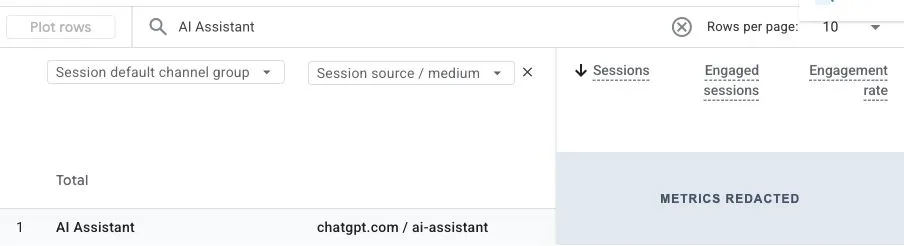
Save the date range, property time zone, channel definition, and any filters with your report. A comparison is only useful when both periods use the same rules.
Check source values before building a custom group
Inspect the source rows even if the native channel is available. This helps you understand historical data and investigate sources that appear outside the expected channel.
For a source-level investigation, use an exploration with Session source / medium and Sessions. Inspect exact values associated with the assistants relevant to your audience. Domain examples include chatgpt.com, perplexity.ai, and gemini.google.com; your report may show different source labels. Use the values actually recorded in your property.
Do not filter only for medium referral: recognized assistant visits can use ai-assistant. Do not classify all google or bing traffic as AI traffic. Those broad sources also include ordinary search activity.
If the source view and native channel disagree, compare the actual rows and date range. The difference is a classification question, not a measurement of “hidden AI traffic.” Never add both totals together without removing overlapping sessions.
When a custom channel group is useful
A custom group is useful when your team needs a documented source definition or a consistent historical analysis. In Admin → Data display → Channel groups, copy an existing group and add a channel with conditions based on verified source values. Google requires Editor access or higher to create and edit groups.
Order matters: GA4 assigns traffic to the first matching channel in that group. Check the rule order against broader channels, then select the custom group's session dimension in the report. Label it as your custom definition. Creating a group does not edit Google's default channel rules or recover a referrer that was never collected.
Connect the visits to landing pages and outcomes
Within the same session scope and date window, inspect Landing page + query string. Identify which pages receive measurable assistant visits, then review whether each page answers the likely question and offers an appropriate next step.
A compact reporting row can contain:
- AI source or channel and the definition used;
- landing page and locale;
- sessions and engaged sessions;
- the specific key event being evaluated;
- sessions with that key event and the session key event rate;
- revenue, where purchase tracking is implemented and verified.
Select a meaningful key event rather than combining every event into one success count. A form start, a submitted inquiry, and a paid order are different outcomes. If the question is lead quality, connect the analysis to your qualified-lead records without putting personal data into public reports.
For example, hypothetical data showing 40 AI-attributed sessions and 2 sessions with a demo-request key event gives a 5% session rate for that event. Report the counts beside the rate. Two requests do not establish a stable conversion advantage, and they are not automatically two qualified customers.
Keep the measurement limits explicit
Missing attribution is not evidence of no influence. Some visits arrive without usable referral information; consent choices, blocking, redirects, or collection failures can also affect what you observe. Investigate your setup before interpreting a zero.
At the same time, do not relabel Direct traffic as AI traffic on suspicion alone. Use “unattributed” when you cannot establish the source. A voluntary “How did you hear about us?” answer can provide additional context, but it is self-reported evidence and should remain separate from analytics attribution.
Crawler activity is another separate signal. A bot fetching a page is not a buyer session or a citation. Review crawler access and its limits when investigating discoverability, then return to actual answer and visit evidence.
Before comparing periods, check for changed channel rules, key-event definitions, consent settings, filters, and incomplete days. Annotate measurement changes so a reporting change is not presented as content performance.
Read traffic alongside citation evidence
Use AI brand monitoring to maintain a separate view of monitored questions, answers, and sources. Align its reporting window with the traffic report, while keeping each dataset's coverage visible.
Our suggested decision rules are:
- Citations rise, visits stay flat: inspect the cited pages, the questions being answered, and whether the answer gives readers a reason to continue. Do not assume analytics is broken.
- Visits rise, useful actions stay flat: inspect landing-page intent, the next step, and key-event collection.
- Useful actions rise on a small sample: preserve the observation and collect more comparable data before declaring a trend.
- Both remain absent: check measurement first, then revisit the buyer questions and page evidence.
AEO Mantis helps investigate the answer-visibility side. Keep GA4 visits and your business records alongside it; this workflow does not imply an automatic join between an individual AI answer and a conversion.
- GA4 AI Assistant traffic and observed AI citations measure different events.
- Google classifies AI Overviews and AI Mode traffic as Organic Search, outside AI Assistant.
- A source filter can only classify information available in the collected data.
- Session comparisons need consistent dates, dimensions, filters, and event definitions.
- Report outcome counts with rates, especially when the sample is small.
Frequently asked questions
No. It reports what it can collect and attribute. Missing referrers, collection limits, and later visits through other channels prevent it from being a complete measure of AI influence.
Start with the native AI Assistant channel and inspect session source values. A custom group is optional when you need your own documented classification or historical comparison.
No. Current Google Analytics definitions include AI Overviews and AI Mode in Organic Search. Keep that limitation explicit when reporting assistant traffic.
Not reliably from those datasets alone. Monitored citations are a sample of answers, while GA4 sessions cover collected visits. They do not supply a shared exposure denominator or a one-to-one click mapping.